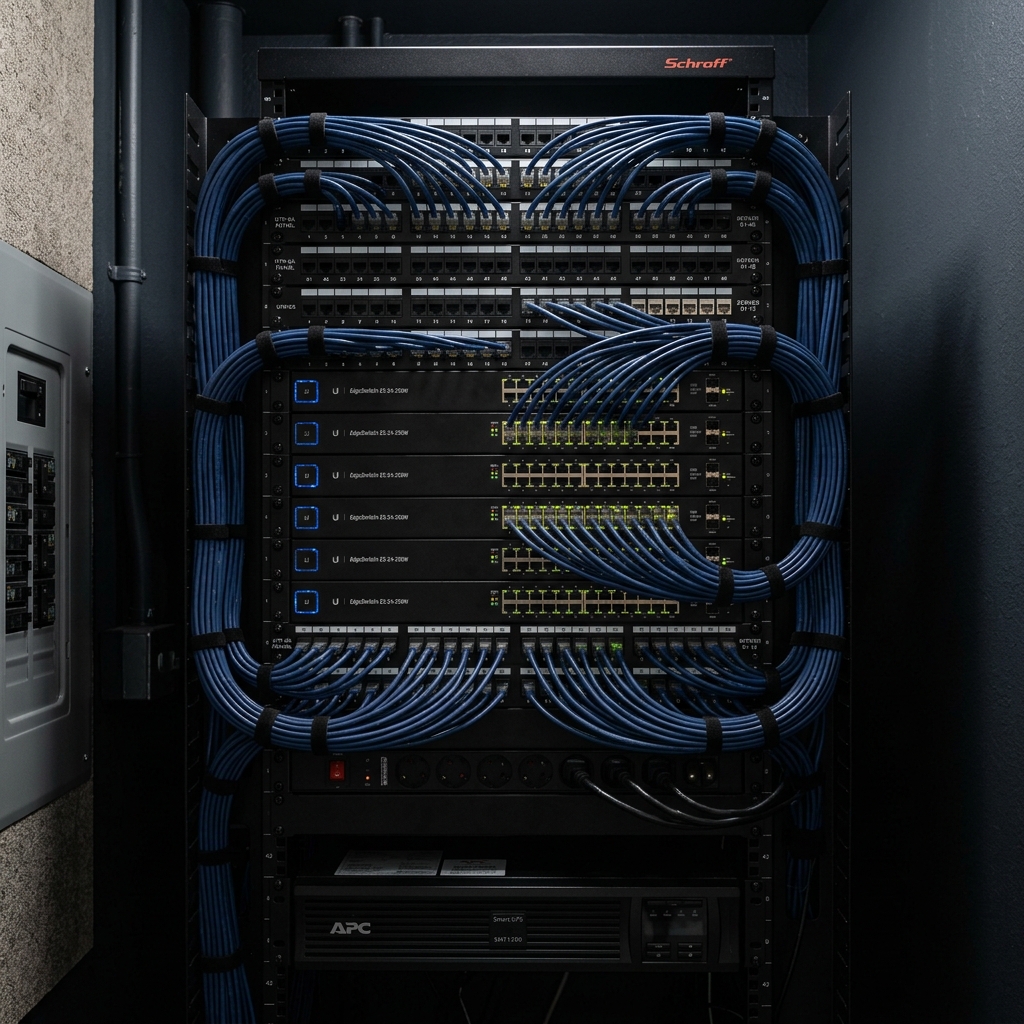
Vellore Village's large, two-storey detached homes on generous lots share a specific timing problem: most were built with a single coax or ethernet drop near the main floor router location, and nothing else. That's fine until you start finishing the basement, setting up a home office, or realize the primary bedroom two floors up gets a weak signal — at which point running new cable means cutting into finished drywall instead of an open stud wall. If you're planning a basement finish or any renovation in Vellore Village, wiring the network first is the cheapest point in the entire project to get it right.
Why This Comes Up So Often in Vellore Village Specifically
Vellore Village's homes are a fairly consistent housing stock — large two-storey detached builds from a similar era — which means a lot of homeowners hit the same wall at the same stage: a finished basement without a wired network closet, and a WiFi router trying to cover three levels from one spot on the main floor. The pattern we see most is a homeowner starting a basement renovation and realizing partway through that this is the moment to add structured wiring, before the drywall goes up.
What “Doing It Before You Finish the Basement” Actually Means
While studs and joists are still exposed, running Cat6 to a handful of key locations — a basement media area, a home office, upstairs bedrooms, an exterior camera location — costs a fraction of what the same runs cost once walls are closed and finished. It also means the cable can be run cleanly through joist bays rather than surface-mounted or fished blindly through insulation after the fact.
What a Typical Structured Wiring Project Includes
A central network panel or rack, usually in a basement mechanical room or closet, where all runs terminate at a patch panel connected to a managed switch. From there, dedicated runs go to a small number of ceiling-mounted access points, rather than relying on WiFi from a single router, plus any wired devices — a smart TV, a gaming console, a home office desk, a security NVR — that benefit from a stable wired connection instead of WiFi.
What Actually Drives the Cost
- Timing — pre-drywall wiring during a renovation costs significantly less than retrofitting finished walls afterward.
- Number of drops — how many rooms and devices get a dedicated cable run versus relying on wireless APs for general coverage.
- Access point count — determined by the home's layout and how many levels need coverage.
- Central equipment — a patch panel and managed switch are a one-time cost that scales with the number of drops, not ongoing.
Frequently Asked Questions
I'm already mid-renovation on my basement — is it too late?
Not necessarily. If walls are still open, we can usually still add runs; once drywall is up, we shift to a smart-switch and access-point approach instead of full structured wiring.
Do I need wiring in every room, or just key locations?
Most homes only need a handful of strategic drops, like a media area, an office, and a couple of access points, rather than every room — we'll help identify which locations actually matter.
Will this replace my WiFi entirely?
No — the wired backbone feeds access points that then provide WiFi coverage; the goal is wired infrastructure feeding wireless coverage, not eliminating WiFi.
What if I'm not renovating right now — is it worth doing without an open wall?
Yes, though the cost is higher without open studs; we use techniques like fishing cable through existing chases and using in-ceiling APs to minimize the work required.
How does this compare to just buying a mesh kit?
A mesh kit is faster to set up but relies on wireless relay between nodes; structured wiring with access points gives every level of a Vellore Village home full-speed, consistent coverage without that relay penalty.
Getting Started
If you're planning a basement renovation, book a walkthrough before drywall goes up — that's the single best-timed call you can make on a networking project. See our networking services, or read our wired AP vs. mesh guide for the bigger picture.